
Reporting learner results – notes for assessors
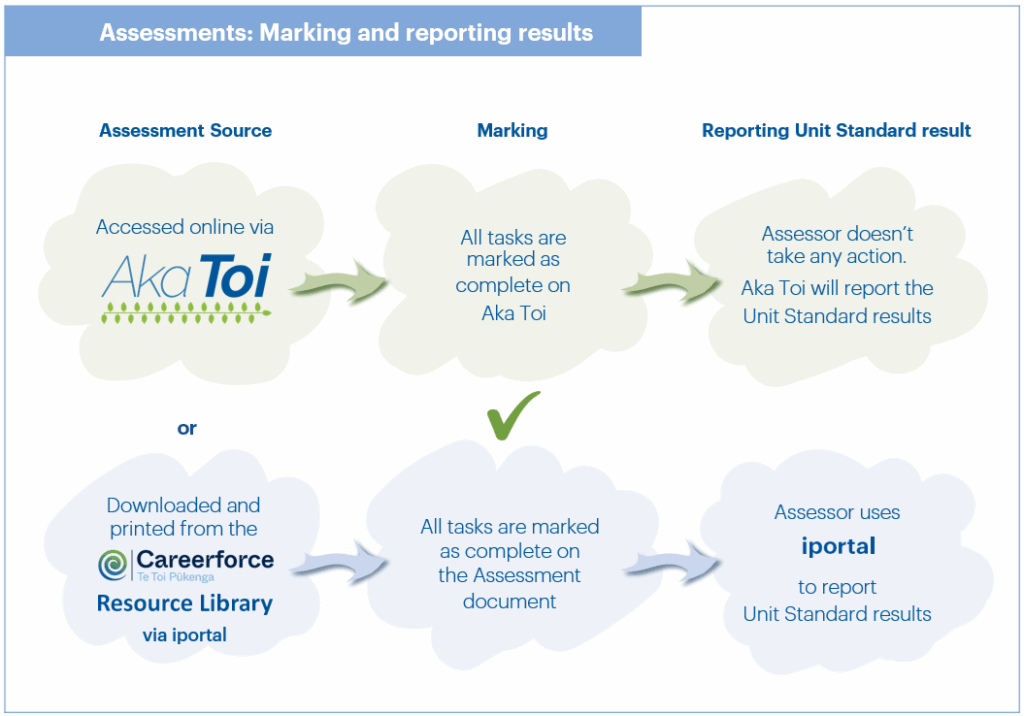
How learner results are reported depends on whether the learner submits tasks via paper-based-learning or Aka Toi.
|
If the learner submits tasks downloaded and printed from the Careerforce Resource Library (via iportal), i.e. paper-based, the results must be submitted via iportal. The results are displayed in real-time. |
If the learner submits tasks via Aka Toi, the assessor doesn’t need to take any action, Aka Toi will report Unit Standard results. |
|
iportal is an online portal for viewing and submitting trainee information. It helps assessors manage trainees, submit results and gives access to the latest Assessor Guides within their scope. Employers can also use iportal to download reports and track their trainees’ progress. https://iportal.careerforce.org.nz
|
Aka Toi is an online learning and assessment platform It’s easy to use and can be accessed anywhere, anytime with an internet connection. Most Careerforce programmes are available using Aka Toi. https://akatoi.careerforce.org.nz/ Note: When a module is completed on Aka Toi, the results will not show on the Trainee Progress Report in iportal until the next working day. |
How to enter results (from paper based learning) you have assessed on iportal
- Select the trainee
- Enter the unit standard and version.
- Enter (or select) the date you assessed the unit (Result Date).
- Click Add Result to Review Table.
Repeat Steps 1-4 as required.
- Click Send results to Careerforce.
Note: Please ensure you click the Send results to Careerforce button.
iportal user guide
For a full guide with instructions on registering for iportal, navigating iportal, entering results, assessor scope and more, download the iportal user guide:
or please contact the Careerforce Client Services team via 0800 277 486 or [email protected]